
Roblox · Jupiter Incident: 2011 · the clipboard
Every Clipboard Task in Jupiter Incident 2011
Observed in playthroughs When the shuttle reaches orbit you unbuckle and take the clipboard and the map. The clipboard holds about ten tasks per run, and the list changes between runs: two playthroughs drew different sets.
The task table
These are the 8 tasks seen on the clipboard so far. Your run will show some of them in its own order, possibly alongside jobs not yet seen here. Tick off what you get and use the table for where to go and what to do.
| Task | Where | How | Status |
|---|---|---|---|
| Swap the tape | The recorder deck; the nav pad marks it | Pick up the fresh tape, drag it into the deck and place it. | Observed in playthroughs |
| Run a suit check / charge the suits | The suit rack | Interact with each suit on the rack until the check finishes. One draw words this task as charging the suits. | Observed in playthroughs |
| Swap the CO2 canister | The life-support canister slot | Take out the spent canister, then drag the new one into the slot and place it. | Observed in playthroughs |
| Check the window sills | Along the cabin windows | Walk the windows and interact with each sill the clipboard names. | Observed in playthroughs |
| Secure the cargo nets | The cargo area | Drag each net over its load and place it so the load is held. | Observed in playthroughs |
| Set the nav breakers | The navigation breaker panel | Click each breaker the task asks for. Breakers are single clicks with no timing. | Observed in playthroughs |
| Lock bunk storage | The crew bunks | Close each storage locker and lock it. If a latch will not seat, twist it, then smack it. | Observed in playthroughs |
| Fix the coffee machine | The galley | Watch the gauge and press the pump when it reaches green. | Observed in playthroughs |
Checked · Two public playthroughs of Chapter 1
Where a task sits is given as the part of the ship it belongs to. The nav pad marks the exact spot, so follow it when a room name does not ring a bell.
How the interactions work
Every clipboard job uses one of four hand actions. Learn these once and any task the draw gives you takes a few seconds.
- Drag and place. Most fixes ask you to pick up an object and set it in its slot: a fresh tape, a CO2 canister, a cargo net. Hold the item, line it up with the slot and release.
- Twist, then smack. Some fixtures need a twist to seat the part and a hit to make it take. The fuse boxes later in the chapter use the same move: insert, twist, smack.
- Press on green. The coffee machine runs a gauge. Press the pump when the gauge reaches green.
- Click the breaker. Breakers, from the nav breakers on the clipboard to the engine bay breaker later, are single clicks. No timing, no tool.
What the clipboard does not cover
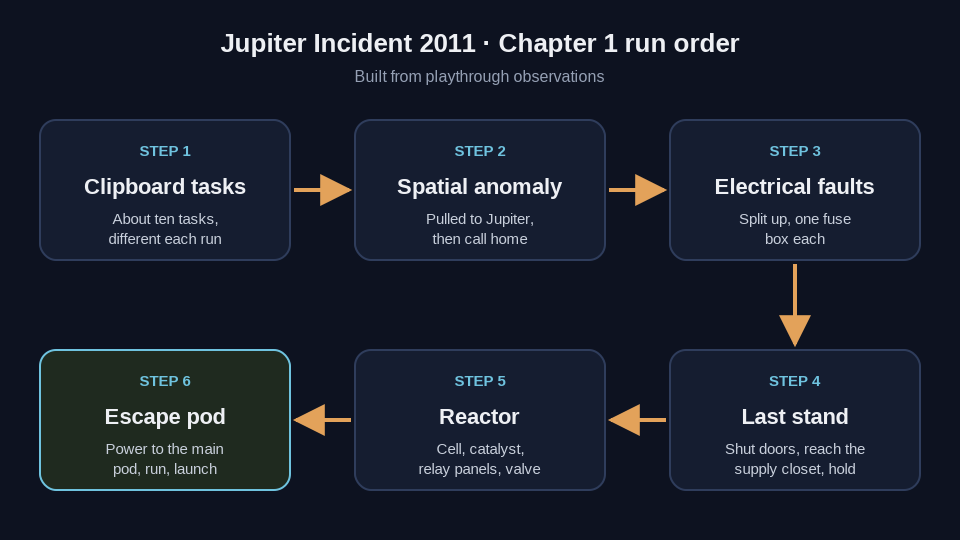
The clipboard is only the first act. Once the last task is done the game stops handing you a list and starts scripting the run, and none of the following ever appears on the clipboard:
- The engine bay restart after the anomaly: reset the breaker, prime the pump, open the coolant, bring main power up.
- The fuse boxes, one per player, each needing a fuse inserted, twisted and smacked until all circuits are restored.
- The last stand in the supply closet once the vents open, held until the seal drops.
- The reactor: a cell, the catalyst escort, relay panels 1, 3 and 5, and a cooling valve you open slowly.
That is the plain difference between a task list and a walkthrough. This page tells you how to do each clipboard job in whatever order the draw gives you. The Chapter 1 walkthrough gives the fixed sequence that follows, with what can end the run at each step.
Clearing the clipboard faster
Observed in playthroughs Crews that cleared the clipboard quickly in playthroughs did the same few things. Treat these as advice, not rules.
- Read the whole clipboard before the crew moves, then split it by area so nobody crosses the ship twice.
- Leave the coffee machine to one player; its gauge rewards patience more than speed.
- Carry one object at a time. Dropping a canister in a dark corridor costs more time than a second trip.
- Pick up flashlight batteries whenever you pass them. The dark parts of the ship are where tasks take longest.
- Regroup when the list is empty. The anomaly follows straight after the clipboard and a scattered crew starts the scripted part badly.
Task questions
- Is the clipboard the same every run?
- No. Two playthroughs drew different sets of tasks, so expect a different list each time. The scripted objectives after the clipboard stay the same.
- How many tasks are on the clipboard?
- About ten per run in the playthroughs this page is built from. This page lists 8 named tasks seen across those runs.
- What comes after the last clipboard task?
- A spatial anomaly pulls the ship toward Jupiter and the scripted chain begins: engine bay, call home, fuse boxes, last stand, reactor and the escape pod.